Computing Ambassadors
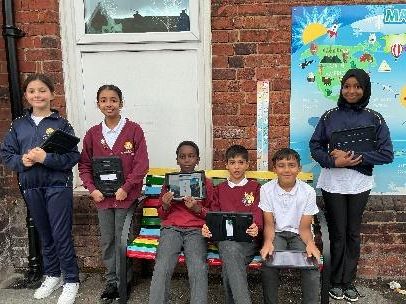
At St Thomas, our computing ambassadors are called the E-Safety Champions. They are pupil representatives who promote computing and online safety within our school. Their role is to help encourage a positive and safe digital culture and support staff and students in raising awareness about e-safety. E-Safety Champions also provide valuable input on how computing is taught and help ensure that pupils have a voice in shaping the school’s approach to digital learning.
Role Description - Main Responsibilities
Promote a Love for Computing:
- Encourage other pupils to take an interest in computing, coding and digital creativity.
- Share fun facts, tech tips and e-safety messages in assemblies, newsletters, or on display boards.
Support Learning Across the School:
- Help teachers during events such as Safer Internet Day in spreading information and awareness.
- Support teachers and peers during computing lessons.
Assist with Computing Clubs:
- Support teachers in running computing clubs by helping to set up devices, encourage participation, and suggesting relevant and engaging activities.
- Help promote the club to children around the school. Gather feedback on what they enjoy or would like to try.
Represent Pupil Voice:
- Gather opinions from classmates about what they enjoy in computing lessons and what could be improved.
- Attend regular meetings with the computing subject leader and other E-Safety champions to share ideas and feedback.
Help with Displays and Resources:
- Assist in creating or updating classroom and corridor displays that promote safe internet sure, highlight computing around school or celebrate digital pioneers.
- Recommend books, websites, or resources that pupils have enjoyed or found helpful.
Celebrate Digital Achievements:
- Recognise and celebrate computing successes for any stand out projects across the school.
- Help promote diversity in computing by highlighting a range of digital pioneers, tech innovators and global achievements.
Model Safe and Responsible Use:
- Demonstrate positive digital behaviour, including respectful communication, safe searching and responsible use of technology daily.
- Set a good example by showing curiosity, problem solving and teamwork during online learning.
What Makes a Good Computing Ambassador?
- A strong interest in technology and how computers are used in everyday life.
- Confident speaker and good listener who can share ideas and help others.
- Responsible, reliable, and organised.
- Willing to take part in events, clubs, and extra tasks.
- Enjoys helping others and working in a team.
Meet Our E-Safety Champions
.jpeg)
Sabrio
Year 5
I became an E-Safety Champion because I want to help people in computing when they don’t understand something. My advice to others would be if you keep trying, one day you will get there!
.jpeg)
Porsha
Year 5
When I’m at home, I like playing games like Roblox and watching YouTube. One day, I would love to create my own game which is why I wanted to become an E-Safety Champion.
.jpeg)
Yousuf
Year 5/6
I love learning about computing in school and practicing at home too! My favourite thing to do is coding sprites on Scratch or making PowerPoints about topics. I wanted to be an E-Safety Champion to help and teach my friends.
.jpeg)
Muhammed-Amaan
Year 5/6
My favourite thing about computing is that it is like a puzzle, I like solving a challenge. As an E-Safety Champion, I will help people if they are stuck or need advice. When I am at home, I enjoy playing Fortnite and FC26 and watching TikToks.
.jpeg)
Anwer
Year 6
I wanted to become an E-Safety Champion to teach others how to use technologies so they can do it with no problem in the future. My advice to others would be to not go on apps that aren’t for children!
.jpeg)
Zoyah
Year 6
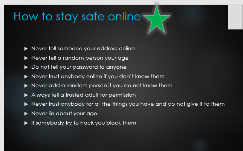
I have lots of advice about how to stay safe online such as: using a strong password and enabling two-factor authentication. I can help people with this which is why I would make a good E-Safety Champion!
Computing Curriculum, Teaching & Learning and Assessment Outcomes
Curriculum
The intent of our Computing curriculum is to equip pupils with the skills, knowledge, and understanding they need to navigate and thrive in an increasingly digital world. We aim to provide a rich, engaging, and well-sequenced computing programme that allows children to:
- Develop computational thinking and problem-solving skills through coding and programming activities.
- Build confidence in using a range of digital tools to create, organise, and present information effectively.
- Understand how technology works and its role in their lives, both now and in the future.
- Learn how to use technology safely, respectfully, and responsibly, with a strong emphasis on digital citizenship and online safety.
In Early Years, our intent is to introduce foundational computing concepts through exploration and play. We encourage children to use age-appropriate technology to support learning, develop basic mouse and keyboard skills, and understand cause and effect through programmable toys and interactive stories. This sets the stage for more structured computing learning in Key Stages 1 and 2.
Teaching & Learning
To achieve our intent, we implement a dynamic and engaging computing curriculum that is carefully structured, progressive, and inclusive. Key elements include:
-
Curriculum Design
We follow a progressive computing curriculum that builds on prior learning across the three strands: Computer Science, Digital Literacy, and Information Technology. It offers increasing challenge from Early Years to Year 6. In Early Years, children explore basic computing skills through play, developing an understanding of cause and effect, sequencing, and simple digital language.
-
Teaching Strategies
Teaching is characterised by hands-on, practical learning, using a wide range of devices, coding platforms, and digital tools to engage pupils and develop key computing skills. Pupils are encouraged to experiment, debug, and reflect on their work, promoting problem-solving and resilience. We integrate computing across the curriculum, allowing children to use technology purposefully in subjects like English, maths, science, and geography. Strong emphasis is placed on e-safety and digital citizenship, with clear, age-appropriate guidance and regular lessons focused on responsible online behaviour.
-
Experiential Learning
Pupils take part in activities such as Safer Internet Day and collaborative digital projects. We offer enrichment opportunities including computing clubs visits from tech professionals to give real-world relevance to learning. In the Early Years, experiential learning includes using digital storytelling, exploring digital sounds and images, and hands-on interaction with devices.
-
Adaptive Teaching
We use a range of adaptive teaching approaches to ensure all pupils can access and succeed in computing lessons, including those with SEND or limited prior experience. Lessons are differentiated through scaffolded instructions, and tailored support from adults or peers. Pupils are encouraged to work independently, in pairs, and in groups to foster collaboration and peer support.
-
Assessment and Feedback
Ongoing formative assessment is used to check understanding, identify misconceptions, and inform future planning. Teachers provide clear and constructive feedback to support progress in areas such as programming, digital content creation, and online safety awareness. Pupils are encouraged to reflect on their own learning through self-assessment and peer review. Progress is tracked against the National Curriculum objectives to ensure children are meeting age-related expectations and to identify pupils who may need additional support or challenge.
Assessment Outcomes
The impact of our computing curriculum is measured through various outcomes and indicators:
-
Pupil Engagement and Enthusiasm
Observations show high levels of interest and engagement during computing lessons. Pupils enjoy exploring new technologies, solving problems through coding, and using digital tools creatively. They are eager to share their learning and apply skills across the curriculum and outside of school too.
-
Knowledge Retention and Understanding
Assessment data shows that pupils consistently achieve age-related expectations in computing. They demonstrate a secure understanding of key concepts such as algorithms, the four C’s, and e-safety. Pupils are increasingly confident in explaining their thinking and applying their knowledge in different programmes.
-
Skills Development
Pupils leave St Thomas’ with strong digital literacy skills, including the ability to code, create digital content, use technology safely, and solve real-world problems. These skills form a solid foundation for secondary computing and the digital demands of modern life. In Early Years, children show developing understanding of technology by using devices purposefully, exploring cause and effect, and engaging in age-appropriate digital play.
-
Cultural Awareness and Identity
Pupils demonstrate a clear understanding of how to stay safe online and behave responsibly in digital spaces. They show respect for others, understand the importance of privacy, and know what to do if they encounter something worrying online. This directly supports the promotion of British Values, especially mutual respect and individual liberty in the digital world.
-
Community Involvement
The computing curriculum promotes meaningful links with the wider community and other areas of learning. Projects often connect with real-world issues, such as online safety campaigns or digital media projects, and help pupils understand how computing is relevant to their everyday lives. Our close working partnership with Bolton Schools ICT also allow us to make use of expert knowledge.
In summary, our intent, implementation, and impact statements reflect a commitment to delivering an inclusive and forward-thinking Computing curriculum. It not only meets national expectations but also prepares pupils to be confident, capable, and responsible digital citizens in an ever-evolving technological world.
Overview of Computing
| Autumn 1 Term | Autumn 2 Term | Spring 1 Term | Spring 2 Term | Summer 1 Term | Summer 2 Term |
|---|---|---|---|---|---|
| Digital citizenship and digital literacy. | Computer Science | Information Technology | Consolidation Project | ||
Computing in the Early Years
In the Early Years Foundation Stage (EYFS), computing is embedded into children's play and learning experiences. It focuses on exploration and hands-on interaction with technology, helping children develop early computing concepts in meaningful and engaging ways. Through a variety of playful experiences, children begin to understand how technology works, what it is used for, and how it fits into their daily lives.
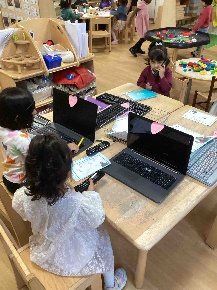
A key aspect of computing in the EYFS is the exploration of technology through role play. In imaginative play, children may use pretend or real devices such as telephones, tills, keyboards, tablets, or cameras. These activities allow them to mimic adult behaviours, such as scanning items or taking photos, helping them understand that technology serves a purpose. This play-based approach encourages early computational thinking by introducing ideas like cause and effect, input and output, and simple sequences.
Programmable toys, such as Beebots, also support early computing development. These child-friendly robots introduce basic coding concepts, including sequencing instructions and problem-solving. By programming a Beebot to follow a path, children build logical thinking, spatial awareness, and directional language (forwards, backwards, left, right). These activities lay the foundation for future learning in computer science and digital literacy.
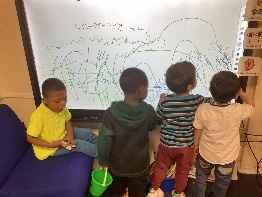
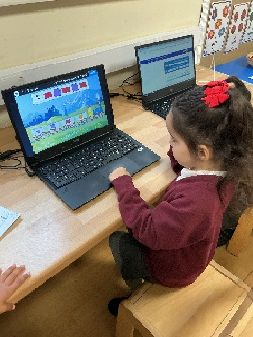
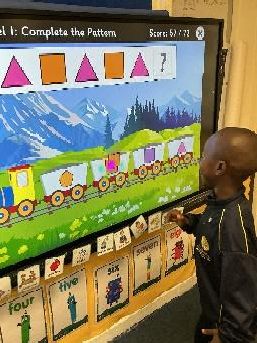
Educational apps and games further enrich EYFS computing. Using tablets or interactive whiteboards, children engage with age-appropriate digital content that develops literacy, numeracy, and fine motor skills. Phonics games, counting activities, or creative apps for drawing and music all help children explore technology while supporting learning across the curriculum.
Children also learn about technology by recognising and using everyday devices. They may observe how technology helps at home (microwaves, washing machines, or remote controls) or notice devices in public spaces like traffic lights and ATMs. These interactions build awareness of how technology functions in real life, helping children connect learning to their world.
Overall, computing in the EYFS fosters logical thinking, creativity, and confidence with technology. It links closely to the EYFS areas of learning, especially Understanding the World, where children explore how technology is part of their environment.
Achievements & Celebrations in Computing





.png)